

What Is HIPAA-Compliant File Sharing?
HIPAA-compliant file sharing is more than a technical term used in the United States. Instead, it refers to the secure transfer of electronic Protected Health Information (ePHI) using technologies and processes that meet strict HIPAA security and privacy requirements.
In addition, HIPAA compliance is not only important for US healthcare providers. Its core principles, including strong encryption, access controls, user authentication, and detailed audit logs, are recognised worldwide as best practices for protecting sensitive patient information.
As a result, many organisations outside the United States also follow these security standards when handling confidential healthcare data. This is especially important for businesses that serve international clients, work with global healthcare partners, or store medical information across multiple regions.
This guide explains the essential requirements of HIPAA-compliant file sharing in simple terms. Furthermore, it explores the challenges of maintaining compliance across different countries, languages, and regulatory environments. By the end of this guide, you’ll understand how to choose a secure file-sharing solution that protects sensitive healthcare data while supporting business growth and international operations.
Why Secure File Sharing Is A Global Healthcare Mandate
Why HIPAA-Compliant File Sharing Matters
In today’s connected world, protecting patient data is a responsibility that extends beyond national borders. Although the Health Insurance Portability and Accountability Act (HIPAA) is a United States law, its security framework has become a trusted standard for healthcare organisations worldwide. As a result, many hospitals, clinics, and healthcare providers use its principles to strengthen data security and improve patient privacy.
Healthcare organisations in the UK, Europe, Asia, and other regions often combine HIPAA best practices with local regulations such as GDPR. By following these standards, organisations can protect sensitive patient information, strengthen cybersecurity, and build long-term patient trust. In addition, they can support secure digital healthcare services across multiple countries.
The risks of failing to protect healthcare data continue to grow. For example, cybercriminals frequently target healthcare organisations because medical records contain valuable personal and financial information. Consequently, a single data breach can disrupt patient care, damage an organisation’s reputation, and result in significant financial losses.
This guide explains the key principles of HIPAA-compliant file sharing in clear, practical language. Furthermore, you’ll learn how to protect electronic Protected Health Information (ePHI), reduce security risks, and choose a secure file-sharing solution that supports both compliance and international business growth.
The Escalating Risk to Patient Data
Cyber threats against the healthcare sector continue to increase. As a result, healthcare organisations need secure file-sharing solutions that protect sensitive patient information across multiple countries.
Globally, the healthcare industry has experienced thousands of security incidents, many involving ransomware attacks and data breaches. Furthermore, cybercriminals frequently target hospitals, clinics, and healthcare providers because medical records contain highly valuable personal and financial information.
This challenge extends well beyond the United States. For example, healthcare organisations across Europe and other regions also face increasing cyberattacks that expose sensitive patient data. Consequently, many providers must comply with regulations such as HIPAA, GDPR, and local data protection laws while protecting electronic Protected Health Information (ePHI).
Traditional file-sharing methods no longer provide adequate protection. For instance, sending patient records through standard email or personal cloud storage creates unnecessary security risks. An unencrypted medical file is similar to sending confidential information on a postcard that anyone can read during delivery.
A single data breach can have serious consequences. It can trigger significant financial penalties, disrupt healthcare services, damage an organisation’s reputation, and reduce patient confidence. Most importantly, it can interrupt patient care and weaken the trust between healthcare professionals and their patients.
Core Pillars of HIPAA-Compliant File Sharing
Healthcare organisations need multiple layers of protection to defend against modern cyber threats. Therefore, HIPAA-compliant file sharing relies on several essential security controls that work together to protect electronic Protected Health Information (ePHI).
Strong Encryption
Healthcare providers should encrypt data both in transit and at rest. This approach prevents unauthorised users from reading sensitive information, even if attackers intercept the files during transmission or gain access to stored data.
Role-Based Access Controls
Not every employee needs access to every patient record. Instead, organisations should use role-based permissions to limit access according to each person’s responsibilities. As a result, doctors, nurses, administrators, and support staff can only view the information they need to perform their duties.
Comprehensive Audit Logs
Every HIPAA-compliant system should record all file activity. For example, audit logs should capture who accessed a file, when they opened it, and what actions they performed. These records help organisations investigate security incidents, demonstrate compliance, and strengthen internal security procedures.
Why These Security Measures Matter
These security controls protect much more than technology. They also protect patient privacy, reduce business risk, and support high-quality healthcare services. In addition, they help organisations meet regulatory requirements while maintaining patient trust.
If you’d like to learn more, explore our guide to secure HIPAA-compliant document sharing. You can also read our article on best practices for secure file sharing to strengthen your organisation’s overall data protection strategy.
Choosing the Right File Sharing Platform for a Global Audience
Picking the right technology for HIPAA compliant file sharing is where all your security planning meets reality, especially when operating internationally. This isn’t just about ticking boxes on a vendor’s feature list; it’s about finding a genuine partner in protecting patient data across borders. You need a practical way to weigh your options, considering technical SEO aspects like hreflang tags for multilingual portals and the ability to create geo-targeted landing pages for different regional compliance needs.
The absolute first step—and this is non-negotiable—is the Business Associate Agreement (BAA). Don’t mistake this for a simple formality. It’s a legally binding contract that holds your vendor accountable for protecting ePHI. If there’s a breach on their end, that BAA is what makes them legally responsible. When you’re looking at potential services, your first question should be whether they will sign formal Data Processing Agreements (DPAs) or BAAs, which are crucial for both HIPAA and GDPR compliance. If the answer is no, walk away.
Must-Have Security Features
A signed BAA is essential, but it’s just the starting point. The platform itself needs a strong set of built-in security features to guard sensitive information against threats, both from the outside world and from within your organization. A BAA is meaningless if the technology backing it is weak.
As you evaluate your options, your checklist has to prioritize these core features:
- End-to-End Encryption: This is the big one. It ensures data is scrambled and unreadable from the second it leaves your device until the moment your recipient opens it. This protection must apply to data both in transit (while being sent) and at rest (when stored on their servers).
- Multi-Factor Authentication (MFA): In today’s environment, a password just isn’t enough. MFA adds a crucial second layer of security, like a code sent to a phone, which dramatically cuts the risk of an account being compromised.
- Granular User Permissions: This feature is your command center for data access. It gives you precise control over who can view, edit, download, or share specific files and folders, allowing you to enforce the Principle of Least Privilege.
- Comprehensive Activity Logging: The system must keep detailed, unalterable audit trails. These logs track every single action taken on a file—who touched it, when they did, and from where. This is invaluable for security audits and for investigating any potential breaches.
These features aren’t nice-to-haves; they are the fundamental pillars of any truly secure system. For a deeper dive into these technical requirements, our a guide to HIPAA compliant cloud storage is a great resource.
The infographic below shows how these elements come together in a continuous cycle.
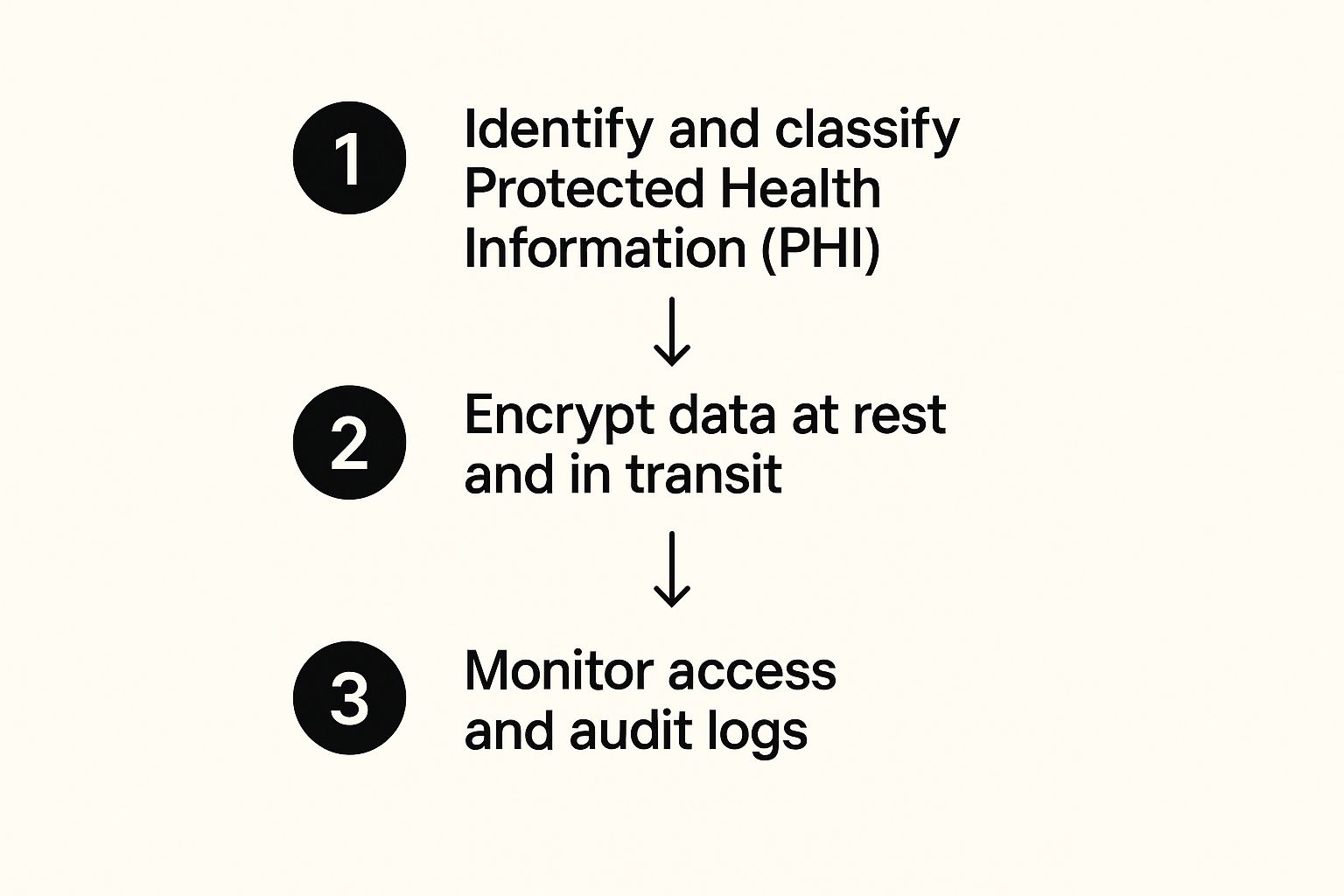
As you can see, solid data protection is never a “set it and forget it” task. It’s a constant process of classifying your data, ensuring it’s encrypted, and keeping an eye on who is doing what with it.
To make it even clearer, here’s a breakdown of the must-have features and why they are so critical in day-to-day healthcare operations, regardless of location.
Essential Features for a HIPAA Compliant File Sharing Solution
| Feature | Why It’s Critical for Compliance | Example in Practice |
|---|---|---|
| End-to-End Encryption | Protects ePHI from being intercepted or read by unauthorized parties, both during transfer and while stored. | A clinic in Germany sends patient lab results to a specialist in the US. Encryption ensures the data is unreadable even if intercepted over international networks. |
| Business Associate Agreement (BAA) | A legally required contract that obligates your vendor to uphold HIPAA security standards, making them liable for breaches. | Your practice signs a BAA with a cloud storage provider, legally binding them to protect the patient records you store on their platform, regardless of patient nationality. |
| Granular Access Controls | Enforces the “minimum necessary” rule by restricting user access to only the specific data they need for their job role. | A billing clerk in your Manila office can only view insurance information, while a physician in London has access to the full patient medical history. |
| Multi-Factor Authentication (MFA) | Adds a vital layer of security to prevent unauthorized access, even if a user’s password has been stolen. | To log in, a nurse must enter their password and then a unique code sent to their mobile phone, stopping a hacker with a stolen password from anywhere in the world. |
| Detailed Audit Trails | Provides a complete, unchangeable record of all activity, which is essential for investigating incidents and proving compliance during an audit. | An administrator can instantly pull a report showing exactly who viewed a specific patient’s file in the last 30 days, including timestamps and IP addresses. |
Ultimately, a truly compliant solution integrates these features seamlessly, making security an enabler of efficient work, not a barrier to it. This includes considering conversion optimization per region; for instance, ensuring the user interface is intuitive for multilingual teams.
Scenarios Where Features Make a Real Difference
Let’s bring this down to earth. Imagine a busy staff member accidentally tries to share a patient’s entire medical record with a research partner in another country instead of the anonymized dataset they were supposed to send. It’s an honest mistake, but one with huge consequences. With granular permissions, you can configure the system to outright block any folder tagged “Full ePHI” from being shared with an external email address, stopping the error before it can even happen.
Here’s another one: you suspect that certain patient records were viewed improperly from an unfamiliar IP address abroad. Instead of a drawn-out, panic-filled investigation, comprehensive audit logs let you know in minutes. An administrator can immediately see which user accounts accessed the files, from what IP addresses, and at precisely what times. This kind of rapid response capability is absolutely critical.
Choosing the right platform is about more than just checking off compliance boxes. It’s about mitigating risk at every possible turn by finding a service that not only promises security but gives you the practical, tangible tools you need to enforce it every single day, across every region you operate in.
Configuring Your System For Maximum Security
A platform that supports HIPAA compliant file sharing is only as strong as its setup. An out-of-the-box configuration is almost never enough; you have to actively fine-tune the security settings to create a genuinely sealed environment for electronic Protected Health Information (ePHI). Simply having the right tools is just the start—how you use them is what truly defines your security posture in the real world.
Misconfigurations are a massive, yet often overlooked, cause of data exposure. In fact, one report revealed that poorly configured cloud infrastructure was to blame for exposing nearly 70% of compromised records. That stark figure shows that human error and sloppy setup are often bigger vulnerabilities than malicious attacks. Locking down your system should be your absolute first priority.
Enforcing the Principle of Least Privilege
The Principle of Least Privilege is a beautifully simple concept: give users the absolute minimum level of access they need to do their jobs, and nothing more. This single strategy dramatically cuts down the risk of both accidental and intentional data misuse, a core tenet of both HIPAA and GDPR.
To put this into practice, you need to get surgical with user roles and permissions. Forget about using generic, one-size-fits-all access levels. Instead, it’s all about creating custom roles based on specific job functions, which might vary by region.
- Clinical Staff: They might need to view and edit patient medical histories, but they should never have the ability to delete records or fiddle with system-wide settings.
- Administrative Staff: They probably need access to billing and demographic information, but they should be completely blocked from seeing detailed clinical notes.
- IT Administrators: While they require high-level access for maintenance, their activities must be closely monitored through detailed audit logs, especially when managing a global user base.
By organizing permissions this way, you ensure that if an account is ever compromised, the potential damage is contained to that user’s very narrow scope of access.
Activating Essential Security Layers
Beyond user roles, several other security settings are non-negotiable for locking down your system. Think of them as layers that work together to create a formidable defence against unwanted access.
First up, enforce a strong password policy. This isn’t just about length; it needs to demand complexity (a mix of upper and lower case letters, numbers, and symbols) and be rotated regularly.
Next, you absolutely must activate multi-factor authentication (MFA) across the board. A password alone just doesn’t cut it anymore. MFA requires a second form of verification, like a code sent to a mobile phone, making it significantly harder for an attacker to get in, even if they’ve stolen a user’s password.
Setting automatic session timeouts is another crucial, yet often overlooked, security measure. This automatically logs users out after a set period of inactivity, preventing unauthorized access from an unattended, logged-in workstation.
Aligning Data Retention With Global Standards
Finally, your security configuration has to address the full data lifecycle, which includes its eventual disposal. Holding onto patient data indefinitely not only creates unnecessary risk but can also clash with data minimisation principles found in both HIPAA and GDPR.
You need to establish and automate a clear data retention and disposal schedule. Work with your legal and compliance teams to figure out exactly how long different types of ePHI must be kept, which may vary by country. Once that period is up, the data should be securely and permanently wiped. This not only shrinks your risk surface but also helps you stay compliant with various international regulations.
You can get a deeper understanding of these practices in our comprehensive guide on how to share files securely. By taking these configuration steps, you transform a compliant platform into a true fortress for patient data.
Building Your Human Firewall Through Staff Training
You can have the most advanced security tech in the world, but it can all be undone by a single, uninformed click. While secure platforms and careful configurations are critical for HIPAA-compliant file sharing, it’s your team that stands on the true front line of defence. The goal isn’t just to avoid mistakes; it’s to turn your staff from a potential weak link into a robust human firewall, especially when dealing with multilingual teams and localized content.
Technology gives you the locks, but it’s people who hold the keys. What you’re really trying to build is a security-first mindset, where every person instinctively understands their role in protecting sensitive patient data. This all starts with clear, accessible, and potentially multilingual policies that people can actually use.
It’s no secret that healthcare is a major target. The latest data shows a staggering 239% increase in hacking incidents targeting the sector between 2018 and 2023. For global organizations navigating both HIPAA and GDPR, this makes airtight file-sharing methods more urgent than ever. A compliant solution has to weave together encryption, strict access controls, and full audit trails to meet the overlapping demands of HIPAA, GDPR, and other regional data protection acts.
Developing Clear and Actionable Policies
Vague guidelines are worse than useless in a real-world scenario. Your file-sharing policies need to be direct, easy to digest, and leave zero room for guesswork. For international teams, this means creating localized content—translating policies and training materials to ensure clarity and comprehension across different languages and cultures.
Your policies should spell out the answers to these critical questions in plain English:
- What data can be shared? Clearly define what counts as ePHI. Give concrete examples like lab results, patient identifiers, or clinical notes.
- With whom can it be shared? List the specific internal roles and approved external partners (like specialists or billing services) authorized to receive ePHI, noting any cross-border data transfer restrictions.
- How must it be shared? This is non-negotiable. Mandate the use of the company-approved secure platform for all ePHI transfers and explicitly forbid personal email, consumer cloud services, or messaging apps.
When you create straightforward, localized rules, you give your team the confidence to make the right call every single time. For more on this, our guide to secure document sharing offers some great best practices.
Implementing Continuous Training, Not One-Off Sessions
A single annual training session is a box-ticking exercise that’s quickly forgotten. If you want to build a lasting security-first culture, training has to be an ongoing, engaging process that reinforces good habits all year round.
The most effective training moves beyond abstract rules and immerses staff in real-world situations. It’s about building muscle memory so that spotting a threat becomes second nature.
Your training program should be a dynamic mix of different formats to keep people engaged. Consider a strategy that includes different content types that drive global conversions and comprehension:
1. Regular Phishing Simulations
Send out simulated phishing emails that look just like the real attacks targeting healthcare. These tests give staff a safe space to fail, learn, and sharpen their ability to spot a malicious attempt. Use the results to see who might need a bit of extra coaching.
2. Scenario-Based Workshops
Forget boring lectures. Present your teams with realistic situations, perhaps localized to their region. For example: “A partner organization in the EU emails you asking for a patient list for a research project, but they aren’t on our approved vendor list. What are the GDPR and HIPAA implications?” Talking through these scenarios as a group helps solidify the correct procedures in a way a PowerPoint slide never could.
3. Bite-Sized Security Updates
Use your internal newsletter or team meetings to share brief “security tips of the week” in multiple languages. You could highlight a new type of scam doing the rounds, offer a quick reminder about password hygiene, or even share a success story where an employee correctly spotted and reported a threat.
This continuous approach transforms training from a chore into a core part of your company culture, ensuring your human firewall gets stronger and more resilient over time.
Maintaining Compliance with Ongoing Audits
Getting compliant isn’t a one-and-done project; it’s a continuous commitment. For any organization serious about HIPAA compliant file sharing, especially those with international operations, the real work starts after you’ve got everything set up. It’s this ongoing vigilance that separates a genuinely secure environment from one that just has the right tools.
You have to constantly monitor, audit, and refine your processes. Security threats are always evolving, human error is inevitable, and even the best policies can drift over time. Without regular checks, the most robust system can develop weak spots, leaving sensitive patient data dangerously exposed across different jurisdictions.
Leveraging Built-In Audit Logs and Reports
Your chosen file-sharing platform should be your best friend here, offering a goldmine of data through its audit logs and reporting features. These tools are your first line of defence in maintaining compliance. They give you an unchangeable record of every single action taken within your system, opening a clear window into user behavior.
Regularly reviewing these logs isn’t just a “best practice”—it’s an operational necessity. You should be actively hunting for unusual activity that might signal a problem. This proactive approach lets you spot potential issues before they spiral into full-blown incidents.
Keep an eye out for these key activities:
- Failed Login Attempts: A sudden spike in failed logins from one account or IP address could be a brute-force attack in progress.
- Large-Volume Downloads: An employee suddenly downloading hundreds of files when their role doesn’t require it is a massive red flag for data theft.
- After-Hours Access: Someone accessing sensitive files late at night or over the weekend needs immediate investigation, especially if from an unusual geographic location.
- Permission Changes: Any change to user permissions or folder access rights should be scrutinized to ensure it was authorized.
By making log reviews a routine part of your security protocol, you shift from being reactive to proactive.
Think of audit logs as your system’s security camera footage. You don’t just review it after a break-in; you monitor it consistently to deter threats and spot suspicious behaviour as it happens.
Conducting Periodic Internal Audits
While daily log reviews are great for spotting immediate threats, periodic internal audits give you a much broader view of your compliance health. These are structured, deep dives into your entire file-sharing ecosystem. A comprehensive guide to IT compliance standards can simplify this process by outlining exactly what regulators expect to see.
An internal audit needs to be a systematic check-up, not a random search. Here’s a practical checklist to guide your efforts:
- Review User Access Rights: Does everyone still have the minimum access they need to do their jobs? Check if employees who have changed roles or left the company still have active accounts.
- Test Security Configurations: Is multi-factor authentication still mandatory? Are your password policies actually being enforced?
- Assess Policy Adherence: Talk to your staff. Make sure they understand and are following the secure file-sharing procedures, including any localized policies for their region.
- Validate BAA/DPA Status: Confirm that your Business Associate Agreements or Data Processing Agreements with all third-party vendors are current and properly signed.
These audits should be done at least once a year—more often if you’re a larger organization. The goal is simple: find and fix vulnerabilities before an external auditor does.
The Critical Role of an Incident Response Plan
No matter how strong your defences are, you have to prepare for the worst. A documented incident response plan is a non-negotiable part of HIPAA compliant file sharing. When a potential breach happens, a clear plan prevents panic and enables a swift, organized response to minimize the damage.
Your incident response plan is your playbook for a crisis, outlining clear steps for everyone to follow.
Key Stages of an Incident Response Plan:
- Containment: Your immediate priority is to stop the breach from spreading. This could mean isolating affected systems from the network or disabling compromised user accounts.
- Investigation: Once contained, you need to figure out the scope of the breach. What data was accessed? Who was affected? How did the attacker get in? Your audit logs will be absolutely vital here.
- Reporting and Notification: Based on your findings, you must follow the strict breach notification rules under all applicable regulations (e.g., HIPAA, GDPR). This includes notifying affected individuals and the relevant regulatory bodies within tight deadlines.
- Recovery and Review: After the incident is managed, restore your normal operations and conduct a post-mortem review. What lessons were learned? What security controls need to be improved to prevent it from happening again?
For more on this, our article on secure online file transfer offers additional insights into building a truly resilient security framework. Ultimately, maintaining compliance is a cycle of monitoring, auditing, and preparing—ensuring your data protection efforts stay effective day in and day out.
Got Questions? We’ve Got Answers.
When it comes to HIPAA-compliant file sharing, it’s natural to have a lot of questions. Healthcare professionals and IT admins are often caught between local rules and global data standards, trying to find a system that’s both compliant and actually usable for daily work. Getting clear, practical answers is the only way to build a security framework that doesn’t get in the way.
Here are some of the most common questions we hear, with straightforward answers to help you sidestep the big compliance traps.
Can We Just Use Standard Email to Send Patient Files?
The short answer is a hard no. Standard email is fundamentally insecure for sending electronic Protected Health Information (ePHI). Most email services you use every day lack the end-to-end encryption needed to shield data as it zips across the internet. It’s the digital equivalent of mailing sensitive medical records on a postcard for anyone to read.
True HIPAA-compliant file sharing demands a secure, encrypted platform that keeps a complete, auditable log of every file transfer. On top of that, compliance requires you to have a signed Business Associate Agreement (BAA) with your service provider—a legal contract that standard email platforms simply don’t offer. Using a dedicated, secure solution is the only real way to tick all these boxes.
What Exactly Is a Business Associate Agreement (BAA)?
A Business Associate Agreement (BAA) is a legally binding contract between a healthcare provider (the “covered entity”) and any third-party service they use, like a file-sharing platform (the “business associate”). This agreement is an absolute cornerstone of HIPAA compliance.
The BAA legally obligates the vendor to protect any ePHI they handle with the same rigour as the healthcare provider. It outlines their responsibility for safeguarding patient data and defines their liability if a data breach occurs.
For any organization, especially one with international clients, a BAA is non-negotiable due diligence. It formally documents your vendor’s security promises, which aligns nicely with the principles of other data protection laws like GDPR, where it is often referred to as a Data Processing Agreement (DPA). Operating without one for any service that touches ePHI is a serious compliance violation.
How Do HIPAA and GDPR Overlap?
While HIPAA is a US healthcare law and GDPR is the main data protection regulation for the EU and UK, they’re built on many of the same core ideas. This overlap is crucial for any organization with a global footprint.
Both frameworks demand:
- Strong technical security, including robust encryption and tight access controls to protect sensitive information.
- Formal risk assessments to find and fix potential weak spots in your systems.
- Strict rules for breach notification, with tight deadlines for telling regulators and the people affected.
Because they share these foundations, a platform designed to meet HIPAA’s tough technical standards is often an excellent starting point for GDPR compliance. The key is to make sure your chosen solution and your internal policies are flexible enough to handle the specific details of every regulation you need to follow, including data sovereignty requirements.
What Are the Biggest Mistakes We Should Avoid?
One of the most common—and dangerous—mistakes is assuming a platform advertised as “HIPAA compliant” is secure right out of the box. True compliance isn’t a feature you buy; it’s an active process you have to manage.
Failing to properly configure the system leaves massive security holes. This often means neglecting to:
- Set up detailed user permissions to enforce the Principle of Least Privilege.
- Turn on and enforce multi-factor authentication (MFA) for everyone.
- Conduct regular staff training, including localized content for international teams, on secure file-sharing habits.
Another critical error is forgetting to sign a Business Associate Agreement with your vendor. Using popular services like Dropbox or Google Drive without their specific business-tier plans and a signed BAA is not compliant. This oversight leaves your organization exposed to serious legal and financial penalties because there’s no legal contract holding the vendor accountable for protecting your patients’ data.
Ready to secure your data with a truly compliant solution? Digital Fusion Hub offers robust AES-256 encryption, customisable access controls, and detailed audit logs to support your HIPAA and global compliance needs. Simplify your secure file management by visiting Digital Fusion Hub — Sign Up to see how our platform can protect your organization.