
In the architecture of digital defence, technology forms the walls, but human action remains the gatekeeper. According to the Office of the Australian Information Commissioner (OAIC), human error is consistently a leading cause of notifiable data breaches. This reality underscores a critical point for Australian businesses: the most advanced security software is only as strong as the person using it. Effective team training on secure file sharing is not a supplementary measure but a core component of a modern data protection strategy. This guide provides a framework for transforming your team from a potential vulnerability into your most formidable security asset.
The Human Element in Your Data Defence Strategy
Missed opportunities in data protection often stem from an underestimation of simple human mistakes. While malicious attacks capture headlines, the more frequent threats originate from inside the organisation, often without any ill intent. Understanding these common errors is the first step in building a resilient defence. For instance, a simple typo in an email address can send confidential financial reports to the wrong recipient. Similarly, the use of weak, recycled passwords across multiple platforms creates an open invitation for unauthorised access.
The convenience of unvetted personal cloud services, often termed ‘Shadow IT’, presents another significant risk. An employee needing to send a large file quickly might turn to a familiar personal tool, inadvertently moving sensitive company data outside of your secure and monitored environment. Perhaps the most pervasive threat comes from phishing. A cleverly disguised email, appearing as a legitimate invoice or a system alert, can trick a busy employee into revealing login credentials or deploying malware with a single click.
These errors carry substantial financial and reputational consequences. For Australian businesses, non-compliance with the Privacy Act 1988 and its Notifiable Data Breaches (NDB) scheme can lead to significant penalties. As the OAIC’s Notifiable Data Breaches statistics regularly show, human error accounts for a large portion of these reported incidents. Therefore, comprehensive employee security training Australia is a direct investment in risk mitigation. It provides the knowledge base for how to prevent data breaches by addressing their root cause. Ultimately, protecting your data is synonymous with protecting client trust, brand integrity, and your financial stability.
Foundations of a Secure File Sharing Training Program

Moving from acknowledging the problem to implementing a solution requires a structured approach. An effective training program is not a single event but a continuous process designed to build and maintain a security-conscious mindset across your entire organisation. This foundation is built on three essential pillars: a continuous training cycle, a formal policy, and role-specific education.
Building a Continuous Training Cycle
Security knowledge degrades over time as threats evolve. A one-off seminar is insufficient. A robust program begins with comprehensive onboarding for all new hires, establishing security expectations from day one. This should be followed by mandatory annual refreshers for all staff to reinforce core principles and introduce new threat intelligence. To maintain top-of-mind awareness, this formal training should be supplemented with regular micro-training, such as monthly security bulletins, short videos, or quick tips shared through internal communications. This cyclical approach ensures that security remains an active part of your business operations.
Developing a Formal File Sharing Policy
Clarity is essential for compliance. A formal, written file sharing policy for employees eliminates ambiguity and provides a definitive guide for handling company data. As highlighted in guides on creating such policies, a comprehensive document should outline several key areas. Your policy must include:
- Data Classification Levels: Define categories such as Public, Internal, Confidential, and Restricted. This helps employees understand the sensitivity of the information they are handling and the corresponding security requirements.
- Approved Platforms: Provide a definitive list of company-sanctioned tools for secure file sharing. This is critical for preventing the use of unvetted ‘Shadow IT’ applications.
- Sharing Procedures: Detail clear, step-by-step instructions for sharing files both internally with colleagues and externally with clients or partners.
- Access Control Guidelines: Mandate the use of the principle of least privilege, ensuring employees only grant the minimum level of access required for a task.
- Incident Reporting Protocol: Establish a simple, clear process for employees to report a suspected data leak or security incident immediately and without fear of blame.
A well-defined policy, like the ones detailed in resources from experts at Adivi, serves as the backbone of your security posture. Establishing these frameworks can be streamlined with a partner that offers integrated digital solutions to support your policy from the ground up.
Implementing Role-Specific Training Modules
A one-size-fits-all training module is inefficient. Different roles face different risks. Your finance team requires specialised training on identifying sophisticated invoice fraud and business email compromise scams. In contrast, your marketing team needs to understand how to securely share large brand assets and campaign data with external agencies without exposing valuable intellectual property. Tailoring training content to the specific daily workflows and risks of each department makes the lessons more relevant, memorable, and effective, reinforcing your organisation’s expertise and operational intelligence.
Recognising and Responding to Phishing Threats
Modern phishing attacks have moved beyond poorly worded emails with obvious red flags. Today’s threats are sophisticated, often perfectly mimicking notifications from trusted platforms like Microsoft 365 or Google Drive, making them a primary vector for credential theft and malware delivery. This evolution necessitates dedicated phishing awareness training that equips employees with the skills to scrutinise digital communications before acting.
A core component of this training is a practical checklist for identifying suspicious emails. Employees should be taught to methodically check the following:
- Check the Sender: Hover the mouse over the sender’s name to reveal the actual email address. Be vigilant for subtle misspellings or unusual domains, such as ‘service@microsoft-support.co’ instead of an official microsoft.com address.
- Inspect the Links: Before clicking, hover over any hyperlink or button to preview the destination URL. If the web address displayed does not match the expected destination or appears suspicious, it should not be clicked.
- Analyse the Language: Be wary of emails that use urgent, threatening, or emotionally charged language. Attackers often create a false sense of emergency to provoke a hasty, thoughtless reaction.
- Verify Unexpected Requests: If an email contains an unexpected file attachment or a request for credentials, verify its legitimacy through a separate communication channel, such as a direct phone call to the purported sender.
It is also vital to differentiate between general phishing, which casts a wide, impersonal net, and spear phishing, which involves highly targeted and personalised attacks. A spear phishing email might reference a real project, use a colleague’s name, or mention a recent company event to appear credible. As detailed in specialised guides on Microsoft 365 security, these targeted attacks are particularly dangerous. A simple, three-step response protocol is essential: 1) Do not click, reply, or download anything. 2) Immediately report the email to the designated IT contact or department. 3) Delete the email from the inbox. To truly test and reinforce this training, controlled phishing simulations provide a safe environment to measure employee vigilance and identify areas for improvement.
| Attack Type | Target | Method | Example Red Flag |
|---|---|---|---|
| General Phishing | Broad, non-specific audience | Mass emails with generic greetings like ‘Dear User’ | A generic email from ‘PayPal’ asking you to ‘verify your account’ by clicking a link. |
| Spear Phishing | Specific individuals or companies | Highly personalised emails using names, job titles, or project details | An email seemingly from your CEO asking you to urgently process a payment for a known vendor. |
| Whaling | High-level executives (C-suite) | Sophisticated attacks often involving impersonation and extensive research | A fake legal subpoena sent to the CFO that appears to come from a legitimate law firm. |
| Smishing / Vishing | Mobile users | Fraudulent SMS messages (Smishing) or voice calls (Vishing) | An SMS message claiming to be from your bank with a link to ‘unfreeze’ your account. |
Mastering Secure Platforms and Access Controls
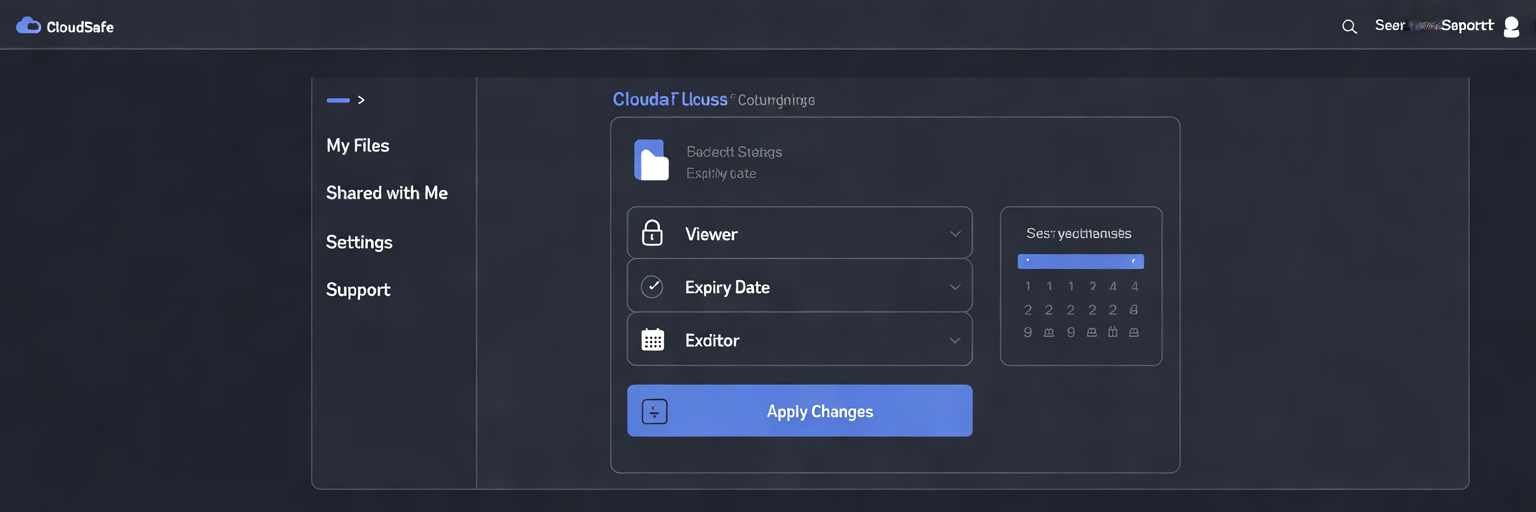
Effective training on human behaviour must be paired with the right technological tools. Even the most security-aware employee can be undermined by inadequate platforms. This section focuses on standardising the tools your team uses and ensuring they are configured for maximum security, creating an environment where the secure way of working is also the easiest.
Combating Shadow IT with Standardised Tools
‘Shadow IT’ refers to the use of unapproved personal applications and services for business purposes. While often done with good intentions for the sake of convenience, it creates significant security risks. Data stored on personal cloud accounts or shared via unvetted messaging apps is outside of company control, leading to potential data leaks, compliance violations, and a complete lack of oversight. The definitive solution is to standardise on a single, company-approved platform for file sharing and collaboration. This centralises data, simplifies management, and ensures all activity occurs within a secure, monitored environment.
Essential Features of a Secure Platform
When selecting a platform, certain technical features are non-negotiable for any business serious about data protection. A truly secure cloud storage for business solution must include:
- End-to-End Encryption: Data must be encrypted both in transit (while being uploaded or downloaded) and at rest (while stored on the server), making it unreadable to unauthorised parties.
- Multi-Factor Authentication (MFA): This mandatory security layer requires users to provide two or more verification factors to gain access, significantly reducing the risk of compromised passwords.
- Granular Access Controls: The platform must allow administrators to set specific permissions, such as view, comment, or edit, for individual users or groups, ensuring data is only accessible to those who need it.
- Comprehensive Audit Logs: A detailed, immutable record of who accessed, modified, shared, or deleted which file, and when, is crucial for accountability and forensic analysis.
Our secure cloud storage solution was designed with these principles at its core, combining enterprise-grade security with a user-friendly interface to support Australian businesses. As technology transforms industries, seen in examples like how AI is changing marketing for freight forwarders, the need for secure, centralised platforms becomes universal. Best practices for remote teams, as outlined by sources like DropSend, further emphasise the importance of these features.
Implementing the Principle of Least Privilege
Beyond the platform’s capabilities is how your team uses it. The ‘principle of least privilege’ is a foundational security concept that should be a key part of your training. It dictates that users should only be granted the minimum level of access necessary to perform their job functions. Train your team to make this their default behaviour. For example, if a colleague only needs to review a document, share it with ‘viewer’ permissions instead of ‘editor’. Encourage sharing with specific individuals rather than entire team distribution lists unless absolutely necessary. This simple practice dramatically reduces the potential impact of a compromised account.
Advanced Protocols for External File Sharing
Sharing data outside your organisation’s controlled environment introduces a higher level of risk. When you send a file to a client, contractor, or partner, you lose direct control over its lifecycle. This expanded attack surface requires more stringent protocols to ensure your data remains secure even after it leaves your network. Training your team on these advanced measures is essential for protecting sensitive information shared with third parties.
A core component of your training program should be a clear, actionable checklist for all external file sharing activities. These practices help mitigate the risks associated with third-party access:
- Password-Protect Links: Every link containing sensitive or confidential information must be protected with a strong, unique password. This acts as the first line of defence against unintended access.
- Use a Separate Communication Channel: A critical security practice is to separate the delivery of the file link from the delivery of the password. Send the link via email, but communicate the password through a different method, such as an SMS message or a direct phone call. This prevents a single compromised email account from giving an attacker both the lock and the key.
- Set Automatic Expiration Dates: Configure shared links to automatically expire after a defined period, such as seven or thirty days. This practice prevents indefinite access to data and reduces the risk posed by ‘forgotten’ shares that remain active long after a project is complete.
- Disable Downloading Where Possible: If the recipient only needs to view or comment on a document, use a platform that allows you to disable the download option. This helps keep the data within the secure viewing environment and prevents unauthorised copies from being made.
Beyond these fundamentals, introduce your team to more advanced security concepts. Digital watermarking, for instance, involves overlaying a visible mark on a document, such as ‘Confidential – For [Client Name] Only’. This not only designates the document’s status but also acts as a psychological deterrent against unauthorised redistribution. Furthermore, Data Loss Prevention (DLP) technology serves as an automated safety net. DLP systems can be configured to identify and block files containing sensitive data patterns, like Tax File Numbers or credit card details, from being shared improperly. Many comprehensive antivirus and security suites include these advanced features, providing an additional layer of automated protection. As noted by compliance experts at Secure Systems, such protocols are especially vital in regulated industries.
Building a Resilient Security-First Culture

Technology and policies provide the framework for security, but a resilient defence is ultimately built on a strong organisational culture. A positive, supportive security culture is far more effective than one based on fear and punishment. The goal is to empower employees to become active participants in the company’s defence, rather than passive subjects of rules. This requires shifting the focus from blaming mistakes to learning from them.
A ‘no-blame’ approach is fundamental. Employees must feel safe to report mistakes, such as accidentally clicking a suspicious link or sending a file to the wrong person, immediately and without fear of reprisal. When an incident is reported quickly, the response team can act faster to contain the threat and minimise potential damage. This transparency turns a potential disaster into a valuable learning opportunity for the entire organisation.
Leadership plays a critical role in cultivating this culture. When managers and senior executives consistently adhere to security protocols, such as using multi-factor authentication and approved platforms for secure file sharing, it demonstrates that security is a shared, non-negotiable responsibility. This ‘tone from the top’ is paramount in showing that security rules apply to everyone and are integral to the business’s success.
To make security training more engaging and memorable, consider implementing practical methods that go beyond traditional presentations:
- Gamification: Introduce friendly competition with leaderboards for phishing simulation performance or award points for completing voluntary training modules.
- Security Champions: Identify and formally recognise employees who demonstrate exemplary security behaviour or proactively assist their colleagues. These champions can act as peer resources and advocates for best practices.
- Real-World Storytelling: Share anonymised case studies of security wins, such as a team member who successfully identified a sophisticated spear phishing attempt, to make the lessons tangible and relatable.
Finally, reinforce training with accessible, easy-to-use resources. As discussed in guides on practical employee training, simple tools are effective. Create one-page ‘cheat sheets’ for common tasks, post quick-reference guides in common areas, and ensure the most secure workflow is also the most intuitive. For ongoing insights, resources like our company blog can provide continuous learning. The objective is to weave security into the fabric of daily operations, making it a natural and seamless part of how your team works.
Measuring and Refining Your Training Program
A security training program is not a ‘set and forget’ initiative. To ensure it remains effective and delivers a tangible return on investment, you must continuously measure its impact and refine your approach. What is not measured cannot be improved. By tracking key performance indicators (KPIs), you can move from assuming your training is working to knowing its precise effect on employee behaviour.
Several key metrics can help you gauge the success of your program. These should be tracked over time to identify trends and measure progress:
- Phishing Simulation Click-Rate: The most direct measure of phishing awareness. A steady decrease in the percentage of employees who click links or open attachments in simulated phishing tests is a clear indicator of success.
- User-Reported Incidents: An increase in the number of employees proactively reporting suspicious emails is a positive sign. It shows heightened awareness and a willingness to engage with security protocols, rather than a rise in actual threats.
- Help Desk Ticket Volume: A reduction in security-related support requests, such as for malware removal or locked accounts due to credential compromise, can indicate that preventative training is reducing risky behaviours.
- Post-Training Assessments: The scores from short quizzes or knowledge checks administered after training sessions provide immediate feedback on information retention and comprehension.
Quantitative data tells only part of the story. It is equally important to gather qualitative feedback. Use anonymous surveys to ask employees what they found most helpful, which topics were confusing, and what additional resources they need. This feedback is invaluable for identifying hidden weaknesses in your program and demonstrates a commitment to improving the employee experience. This structured approach aligns with frameworks for implementing secure file sharing, which also rely on continuous improvement.
This leads to a simple, repeatable cycle for continuous improvement: Measure performance using your defined KPIs. Gather qualitative feedback to understand the ‘why’ behind the numbers. Analyse all the data to identify knowledge gaps or areas where training is not resonating. Finally, Refine your training content, delivery methods, and resources accordingly. The cybersecurity landscape is dynamic, and a successful training program must be just as agile and adaptive to keep your business protected.
Your Partner in Digital Security and Growth
A well-trained, security-conscious team is a business’s most valuable defence against the persistent threat of data breaches. As this guide has shown, achieving this level of resilience requires a structured, ongoing commitment to training, policy, and culture. It is a strategic imperative that protects your assets, your reputation, and your clients’ trust. However, you do not have to build this framework alone.
Digital Fusion Hub is more than a service vendor; we are a comprehensive digital partner invested in the security and growth of Australian businesses. We provide the tools and expertise needed to implement the strategies discussed, transforming security from a complex challenge into a streamlined business advantage.
Our services directly address the core needs of a modern security program. Our secure cloud storage for business provides the centralised, encrypted platform required to eliminate Shadow IT and manage data access with granular control. With our curated selection of software license keys, you can easily equip your team with essential tools, including best-in-class antivirus and security software that incorporates advanced features like Data Loss Prevention. Our expert team is here to provide the ongoing support and guidance your business needs to build and maintain a resilient security culture from the ground up.
Take the next step in securing your business operations. Explore our secure cloud storage plans to find the right fit for your team, or contact us today for a comprehensive consultation on how we can help fortify your digital presence.